
Wodfix Pro
Music Radio OfficialEntertainment
4.7523.00 Reviews
- Version
- 1.1.8
- Installs
- 100.00K
- Age Rating
- Teen
Screenshots
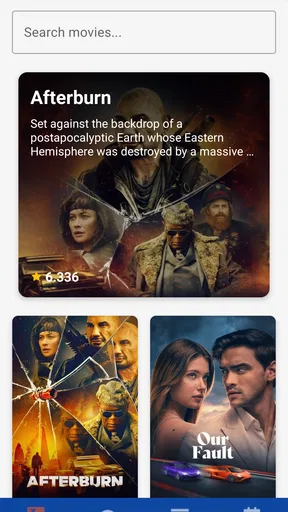
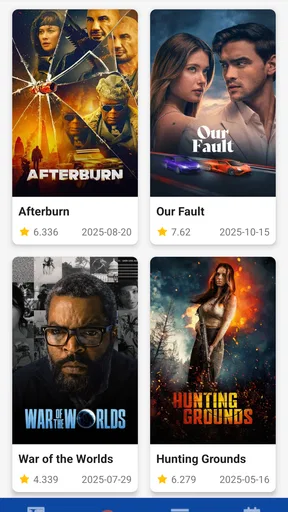
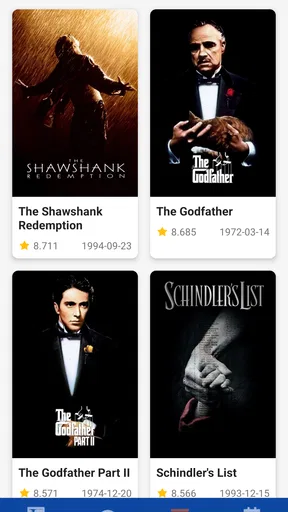
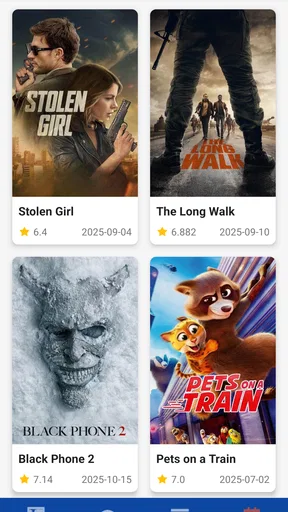
Our Review of Wodfix Pro
 Analysis by Appyee
I spent time with Wodfix Pro as an entertainment app, and my first impression was that it is trying to solve a familiar problem: bringing classic titles, currently screening content, and upcoming releases into one place. That broad focus makes it appealing when I want to browse rather than commit to one specific film or show. It feels more like a discovery companion than a complete replacement for every streaming service I already use.
The app is developed by Music Radio Official, which is an unusual developer name for a cinema-focused product, but the experience itself is centered on entertainment discovery. It is free to use, carries a Teen age rating, and has reached over one hundred thousand installs. Its average score sits at 4.7 from around one thousand seven hundred ratings, with more than five hundred written reviews, so there is clear interest from people who want this kind of organized viewing guide.
How the catalog feels when the connection is good
The strongest part of Wodfix Pro is the way its three-part scope encourages browsing. Classic material gives me a route toward older favorites, current releases help with what is being discussed now, and upcoming titles make the app useful when I am planning what to watch later. Instead of opening a streaming service and searching only within its licensed library, I can use this kind of app to widen the starting point.
That distinction matters. A discovery app can be valuable even when it does not replace the services that actually play the content. I see Wodfix Pro as a place to decide what deserves attention before moving to another platform. If I already know the exact title I want, a direct search in my usual streaming app may be quicker. If I am undecided, however, the wider browsing concept is more useful.
Connectivity shapes nearly every useful moment. The app depends on being able to reach its current information, so a stable connection makes browsing feel purposeful while a weak one can turn a simple search into a pause-and-wait exercise. I would not treat it as a dependable companion for a flight, a subway ride, or a rural trip unless I had already checked what remains accessible in advance.
That network dependence is not automatically a flaw. Entertainment catalogs change, especially around current and upcoming titles, and fresh information generally requires communication with an online service. The trade-off is that the app is most convincing when I am connected and least convenient when I am trying to use it in a dead zone.
What I would use it for first
My favorite use case is the “I have an hour tonight but no idea what to watch” situation. I can begin with recent material, move toward familiar classics if nothing catches my attention, and then look at upcoming options when I want something to keep in mind for later. That sequence is more relaxed than jumping between several services and repeating the same searches.
A second useful workflow is planning a shared movie night. Rather than asking everyone to name a title immediately, I would browse across the different time periods and let the group react to possibilities. This is a small advantage, but it changes the app from a passive list into a conversation starter. It helps when the problem is not access to entertainment but choosing among too many possibilities.
I also found the separation between what is already relevant and what is still ahead useful for avoiding a common mistake: confusing a title’s popularity with its availability. A listing can help me remember or investigate a film, but I still need to check the service I intend to use before assuming I can play it there. That extra check is especially important with current and upcoming content.
Using it on a phone in everyday situations
On mobile, the app makes the most sense in short sessions. I would open it while waiting for an appointment, during a lunch break, or when deciding what to add to a weekend plan. Those moments favor quick scanning over deep research, and the broad entertainment focus gives me several directions to explore without requiring a long setup.
There is also a practical benefit to using a phone rather than a television for the discovery stage. I can compare ideas while someone else is using the main screen, then switch to the appropriate viewing service once the choice is made. In a household with different viewing habits, that separation keeps browsing from interrupting the person who is already watching something.
The limitation is that a phone screen is not the ideal place for an extended catalog session. If I keep scrolling without a clear purpose, the experience can become less about choosing and more about collecting possibilities. I recommend setting a small goal, such as finding three candidates for tonight or identifying two older titles to revisit. That keeps the app from turning indecision into another form of screen time.
Connectivity becomes more noticeable in these mobile contexts. A strong home connection is usually the comfortable environment for browsing, while mobile data can make repeated image-heavy exploration less attractive depending on a user’s plan. I would avoid casually leaving the app open and refreshing pages for long periods when I am watching data usage closely.
What happens when the network becomes unreliable
The main friction point is straightforward: if the connection is unstable, the discovery process loses its rhythm. A title may take longer to appear, a page may need another attempt, or the transition from one area to another may feel less immediate. None of that is unusual for a connected entertainment catalog, but it affects whether I reach a decision or simply give up and open a familiar app.
My practical response is to change the workflow rather than repeatedly tapping. If a page stalls, I pause, check the connection, and try the same action once more. When the network is clearly struggling, I stop browsing and return later instead of treating every delay as a sign that the app itself is broken. This is particularly useful on crowded public Wi-Fi, where repeated refreshes rarely improve the situation.
I would also make the important choice before leaving a reliable connection. If I am preparing for a trip, I use Wodfix Pro at home to identify titles and then verify where I can watch them. That two-step approach is more dependable than expecting a connected catalog to guide me in transit. It also prevents the disappointment of discovering an interesting upcoming title only when I have no practical way to investigate it further.
For recovery, reopening the app after moving back to a stronger network is the sensible approach. I prefer not to build a viewing plan around a page that has only partly loaded. If the app returns to normal after connectivity improves, the problem was probably situational; if the same section remains difficult across several attempts, I would use the app’s broader browsing areas instead of forcing one failing path.
Keeping browsing sensible on limited data
People with generous data plans may never think about this, but catalog browsing can become surprisingly wasteful when it is driven by endless curiosity. My advice is to browse in focused bursts, especially when using cellular data. Start with one category of interest, note the titles that stand out, and then stop once you have enough candidates. The app works better as a decision tool than as an infinite feed.
Home Wi-Fi is the better setting for exploring several sections at once. It gives the app a more stable connection and makes it easier to compare classic, current, and upcoming material without wondering whether a delay is caused by the service or the network. I also prefer to do any follow-up availability checks in the same session, while the title and its context are still fresh in my mind.
There is a useful trade-off here. The app’s wide scope encourages discovery, but that same breadth can lead to more loading and more time spent browsing. A narrow search in a dedicated streaming service is usually more efficient when I already know the genre, actor, or title I want. Wodfix Pro earns its place when I need help forming the question, not when I already have the answer.
I would not judge the app solely by whether it starts entertainment playback immediately. Its role is different. The value comes from reducing the effort of deciding what to investigate next. That makes it a better fit for viewers who enjoy browsing and a weaker fit for anyone who wants one tap from app launch to a guaranteed playable video.
Where it fits beside familiar alternatives
Compared with a streaming service’s built-in recommendations, Wodfix Pro has a broader discovery angle because it is not limited to the same viewing library in the way a single service often is. That can expose me to older or future-oriented choices that I might not encounter in a platform designed mainly to keep me inside its own catalog.
Compared with a general web search, it offers a more focused entertainment starting point. A web search can answer almost anything, but it can also produce scattered results, promotional pages, and unnecessary detours. Wodfix Pro is more convenient when I want to browse titles as entertainment options rather than research every detail about them.
Compared with a dedicated watchlist tool, its apparent strength is the movement between time periods and viewing interests. A watchlist is better for long-term personal organization once I have already chosen titles. This app is more useful earlier, when I am still deciding what deserves a place on that list.
That comparison also shows who should skip it. If I only watch one service, always know what I want, or need a fully offline planning tool, the extra discovery layer may feel unnecessary. Likewise, viewers who expect the app itself to guarantee playback access should use a direct streaming platform instead. The best audience is someone who wants a compact way to explore entertainment possibilities before making the final viewing decision elsewhere.
Version, age suitability, and practical expectations
The current version is 1.1.8, and it runs on Android 7.0 or later. That gives the app a relatively broad reach for people using older compatible phones, although the everyday experience will still depend on the device, connection quality, and how comfortably the screen handles browsing. I would keep the app updated when an update is available because connected catalogs benefit from ongoing maintenance, even though an update alone cannot solve a weak network.
The Teen rating is worth taking seriously for families. It signals that this is not an app I would hand to a young child without supervision. Since the service brings together entertainment from different periods and focuses on discovery, parents should remain involved in deciding which titles are appropriate rather than assuming that every suggestion suits every age.
The free price lowers the barrier to trying it. I can test whether its browsing approach fits my habits without making a purchase decision first. That is helpful because the app’s usefulness is personal: someone who enjoys choosing from a wide range may return often, while someone who prefers a single familiar catalog may find it redundant after a few sessions.
My connectivity verdict
Wodfix Pro works best as a connected entertainment guide for people who want help moving between classic, current, and upcoming viewing ideas. I like it most when I have a reliable network, a little time to browse, and no fixed title in mind. Its strongest contribution is not replacing a streaming service; it is making the first decision easier.
The network requirement also defines its limits. I would not depend on it as my only planning tool in places with unreliable reception, and I would use focused sessions on cellular data rather than browsing without an endpoint. Those are manageable compromises if I understand what the app is designed to do.
After using it, I would recommend trying it to a friend who regularly says, “There is nothing to watch,” even though several services are available. I would suggest skipping it to someone who wants instant playback, offline certainty, or a tightly personal watchlist above all else. For the right viewer, the free app from Music Radio Official is a convenient discovery layer, and its 4.7 average reflects why that simple idea has attracted a growing audience.
My final advice is to use Wodfix Pro before the viewing session, not instead of the viewing service. Open it on a dependable connection, choose a small number of candidates, verify where the selected title can be watched, and then close the browsing loop. Used that way, it feels focused, practical, and much less likely to become another source of endless scrolling.
Verdict
Strengths of Wodfix Pro
- Simple interface makes browsing and finding content quick.
- Large selection of movies and series in one place.
- Search tools help locate specific titles efficiently.
- Regular content updates can keep the catalog feeling fresh.
- Supports convenient streaming directly from a mobile device.
Limitations of Wodfix Pro
- Content availability may vary by region or change without notice.
- Video quality can depend heavily on your internet connection.
- Some titles may lack subtitles or multiple audio options.
- The app may use significant mobile data during extended streaming.
- Compatibility and performance can differ across Android and iOS devices.
Similar Picks in This Category
View All
Google Play Games
Google LLC3.9

Netflix
Netflix, Inc.4.8

YouTube Kids
Google LLC4.2

Disney+
Disney4.4

Prime Video
Amazon Mobile LLC4.7

Steam
Valve Corporation3.2
Frequently Asked Questions
What is Wodfix Pro and what can users do with it?
Wodfix Pro is presented as an entertainment-focused application for accessing and organizing video content. Depending on the version and region, its catalog, playback options, and available categories may differ. Before downloading, users should review the official description carefully to confirm whether the app provides the type of movies, series, or other content they expect and whether it is compatible with their Android or iOS device.
Is Wodfix Pro free to download and use?
The download may be available without an upfront charge, but that does not always mean every feature or title is completely free. Wodfix Pro may include advertising, optional purchases, subscriptions, or restricted content depending on the platform and location. It is advisable to check the app-store listing, payment terms, and subscription conditions before creating an account or entering billing information.
Is Wodfix Pro safe and legal to install?
Users should download Wodfix Pro only from a trusted, official source and avoid modified APK files or unofficial websites that may contain malware. The legality and availability of video content can vary by country, licensing agreements, and how the application distributes media. Check the developer information, permissions, privacy policy, and user reviews before installation, particularly if the app requests access unrelated to its core purpose.
Does Wodfix Pro require an account or an internet connection?
An internet connection is generally needed to browse the catalog, load information, and stream online content. Some features may require registration, while others could be accessible without an account, depending on the current version. Offline viewing should not be assumed unless it is clearly mentioned in the official listing. Users should also consider mobile-data consumption and use Wi-Fi when streaming for long periods.
Which devices support Wodfix Pro, and what should I check before downloading?
Compatibility depends on the version released for Android or iOS, the operating-system requirements, and the developer’s current support policy. Before downloading, confirm that your device meets the minimum system version, has enough free storage, and can run the application smoothly. Older phones or tablets may experience slower loading, playback problems, or missing features, while availability may also vary by country and app store.
